- Basics
- What are some of the advantages of MongoDB?
- What is a Document in MongoDB?
- What is a Collection in MongoDB?
- What are Databases in MongoDB?
- What is the Mongo Shell?
- How does Scale-Out occur in MongoDB?
- What are some features of MongoDB?
- How to add data in MongoDB?
- How do you Update a Document?
- How do you Delete a Document?
- How to perform queries in MongoDB?
- What are the data types in MongoDB?
- What is an Embedded MongoDB Document?
- How can you achieve primary key - foreign key relationships in MongoDB?
- When should we embed one document within another in MongoDB?
- How is data stored in MongoDB?
- When to use MongoDB?
- What is upsert operation in MongoDB?
- How to perform a delete operation in MongoDB?
- If you remove a document from database, does MongoDB remove it from disk?
- Explain the structure of ObjectID in MongoDB?
- What is a covered query in MongoDB?
- Intermediate
- How is Querying done in MongoDB?
- Explain the term “Indexing” in MongoDB.
- What are Indexes in MongoDB?
- What are the types of Indexes available in MongoDB?
- Explain Index Properties in MongoDB?
- What are Geospatial Indexes in MongoDB?
- How many indexes does MongoDB create by default for a new collection?
- Why does Profiler use in MongoDB?
- How to remove attribute from MongoDB Object?
- What is “Namespace” in MongoDB?
- What is Replication in Mongodb?
- Explain the process of Sharding.
- Explain the SET Modifier in MongoDB?
- Advanced
- What do you mean by Transactions?
- What are MongoDB Charts?
- What is the Aggregation Framework in MongoDB?
- Explain the concept of pipeline in the MongoDB aggregation framework.
- What is a Replica Set in MongoDB?
- What is Replica Set in MongoDB?
- How does MongoDB ensure high availability?
- Explain the Replication Architecture in MongoDB.
- What are some utilities for backup and restore in MongoDB?
- What are the differences between MongoDB and SQL-SERVER?
- How can you achieve transaction and locking in MongoDB?
- How MongoDB supports ACID transactions and locking functionalities?
- What are the best practices for MongoDB Transactions?
- Explain limitations of MongoDB Transactions?
- When to Use MongoDB Rather than MySQL?
- Should I normalize my data before storing it in MongoDB?
- What is oplog?
- Does MongoDB pushes the writes to disk immediately or lazily?
- What is Sharding in MongoDB?
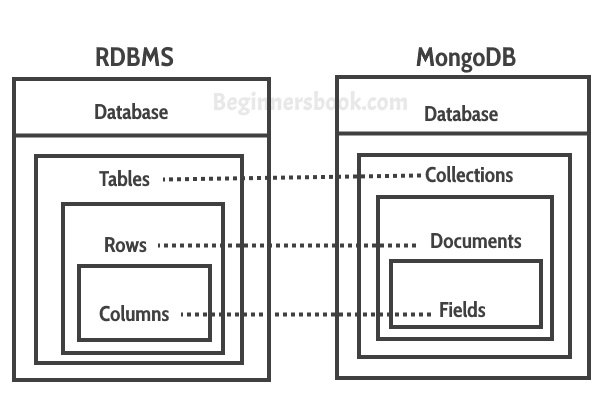
MongoDB is a document-oriented NoSQL database used for high volume data storage. Instead of using tables and rows as in the traditional relational databases, MongoDB makes use of collections and documents. Documents consist of key-value pairs which are the basic unit of data in MongoDB. Collections contain sets of documents and function which is the equivalent of relational database tables.
Key Components
-
_id: The _id field represents a unique value in the MongoDB document. The _id field is like the document’s primary key. If you create a new document without an _id field, MongoDB will automatically create the field.
-
Collection: This is a grouping of MongoDB documents. A collection is the equivalent of a table which is created in any other RDMS such as Oracle.
-
Cursor: This is a pointer to the result set of a query. Clients can iterate through a cursor to retrieve results.
-
Database: This is a container for collections like in RDMS wherein it is a container for tables. Each database gets its own set of files on the file system. A MongoDB server can store multiple databases.
-
Document: A record in a MongoDB collection is basically called a document. The document, in turn, will consist of field name and values.
-
Field: A name-value pair in a document. A document has zero or more fields. Fields are analogous to columns in relational databases.
# Basics
# What are some of the advantages of MongoDB?
- MongoDB supports field, range-based, string pattern matching type queries. for searching the data in the database
- MongoDB support primary and secondary index on any fields
- MongoDB basically uses JavaScript objects in place of procedures
- MongoDB uses a dynamic database schema
- MongoDB is very easy to scale up or down
- MongoDB has inbuilt support for data partitioning (Sharding).
# What is a Document in MongoDB?
A Document in MongoDB is an ordered set of keys with associated values. It is represented by a map, hash, or dictionary. In JavaScript, documents are represented as objects:
1 | |
Complex documents will contain multiple key/value pairs:
1 | |
# What is a Collection in MongoDB?
A collection in MongoDB is a group of documents. If a document is the MongoDB analog of a row in a relational database, then a collection can be thought of as the analog to a table.
Documents within a single collection can have any number of different “shapes.”, i.e. collections have dynamic schemas.
For example, both of the following documents could be stored in a single collection:
1 | |
# What are Databases in MongoDB?
MongoDB groups collections into databases. MongoDB can host several databases, each grouping together collections.
Some reserved database names are as follows:
admin
local
config
# What is the Mongo Shell?
It is a JavaScript shell that allows interaction with a MongoDB instance from the command line. With that one can perform administrative functions, inspecting an instance, or exploring MongoDB.
To start the shell, run the mongo executable:
1 | |
The shell is a full-featured JavaScript interpreter, capable of running arbitrary JavaScript programs. Let’s see how basic math works on this:
1 | |
# How does Scale-Out occur in MongoDB?
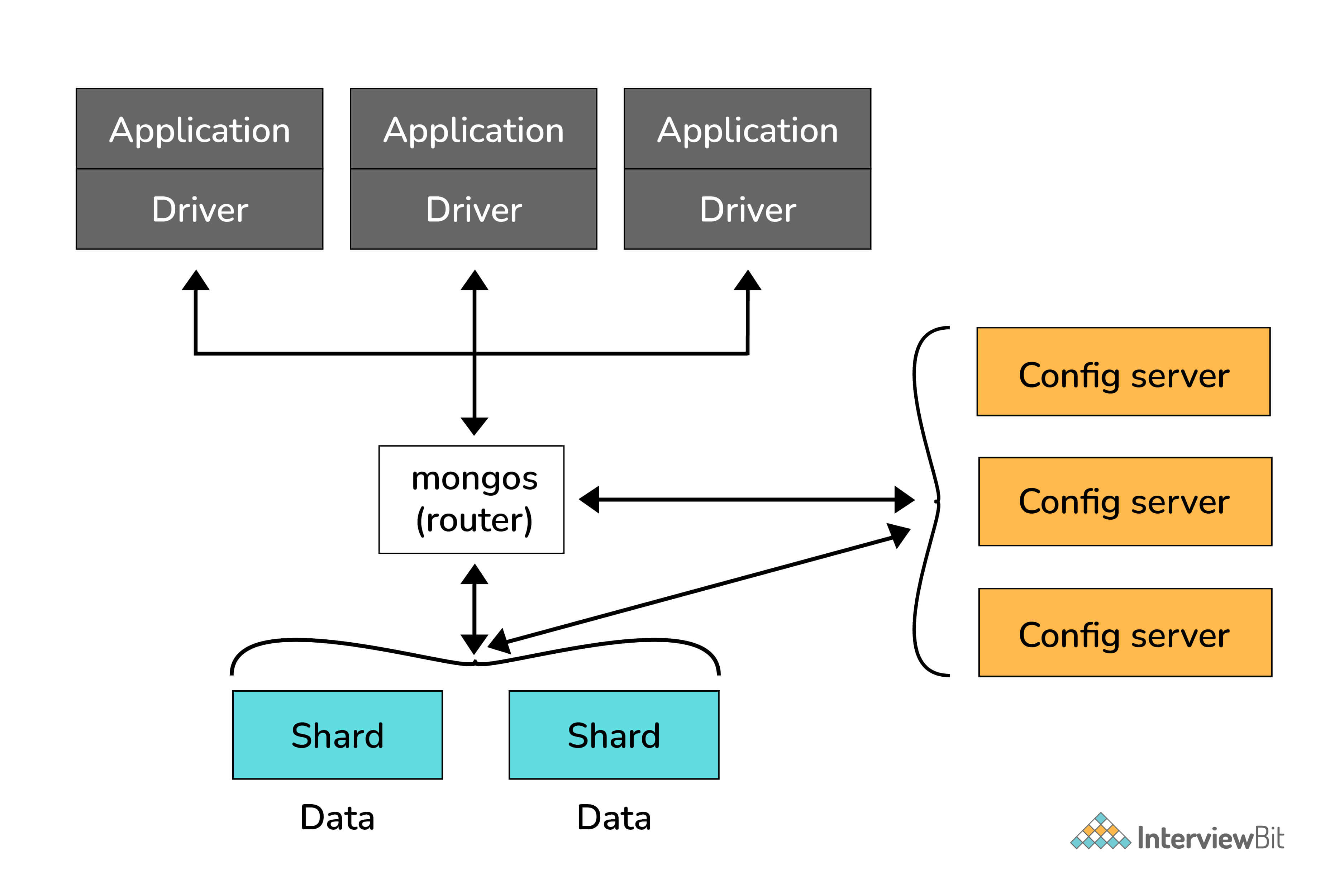
The document-oriented data model of MongoDB makes it easier to split data across multiple servers. Balancing and loading data across a cluster is done by MongoDB. It then redistributes documents automatically.
The mongos acts as a query router, providing an interface between client applications and the sharded cluster.
Config servers store metadata and configuration settings for the cluster. MongoDB uses the config servers to manage distributed locks. Each sharded cluster must have its own config servers.
# What are some features of MongoDB?
- Indexing: It supports generic secondary indexes and provides unique, compound, geospatial, and full-text indexing capabilities as well.
- Aggregation: It provides an aggregation framework based on the concept of data processing pipelines.
- Special collection and index types: It supports time-to-live (TTL) collections for data that should expire at a certain time
- File storage: It supports an easy-to-use protocol for storing large files and file metadata.
- Sharding: Sharding is the process of splitting data up across machines.
# How to add data in MongoDB?
The basic method for adding data to MongoDB is “inserts”. To insert a single document, use the collection’s insertOne method:
1 | |
For inserting multiple documents into a collection, we use insertMany. This method enables passing an array of documents to the database.
# How do you Update a Document?
Once a document is stored in the database, it can be changed using one of several update methods: updateOne, updateMany, and replaceOne. updateOne and updateMany each takes a filter document as their first parameter and a modifier document, which describes changes to make, as the second parameter. replaceOne also takes a filter as the first parameter, but as the second parameter replaceOne expects a document with which it will replace the document matching the filter.
# How do you Delete a Document?
The CRUD API in MongoDB provides deleteOne and deleteMany for this purpose. Both of these methods take a filter document as their first parameter. The filter specifies a set of criteria to match against in removing documents.
For example:
1 | |
# How to perform queries in MongoDB?
The find method is used to perform queries in MongoDB. Querying returns a subset of documents in a collection, from no documents at all to the entire collection. Which documents get returned is determined by the first argument to find, which is a document specifying the query criteria.
Example:
1 | |
# What are the data types in MongoDB?
MongoDB supports a wide range of data types as values in documents. Documents in MongoDB are similar to objects in JavaScript. Along with JSON’s essential key/value–pair nature, MongoDB adds support for a number of additional data types. The common data types in MongoDB are:
Null
1 | |
Boolean
1 | |
Number
1 | |
String
1 | |
Date
1 | |
Regular expression
1 | |
Array
1 | |
Embedded document
1 | |
Object ID
1 | |
Binary Data
Binary data is a string of arbitrary bytes.
Code
1 | |
# What is an Embedded MongoDB Document?
An embedded, or nested, MongoDB Document is a normal document that is nested inside another document within a MongoDB collection. Embedding connected data in a single document can reduce the number of read operations required to obtain data. In general, we should structure our schema so that application receives all of its required information in a single read operation.
Example:
In the normalized data model, the address documents contain a reference to the patron document.
1 | |
Embedded documents are particularly useful when a one-to-many relationship exists between documents. In the example shown above, we see that a single customer has multiple addresses associated with him. The nested document structure makes it easy to retrieve complete address information about this customer with just a single query.
# How can you achieve primary key - foreign key relationships in MongoDB?
The primary key-foreign key relationship can be achieved by embedding one document inside the another. As an example, a department document can have its employee document(s).
# When should we embed one document within another in MongoDB?
You should consider embedding documents for:
- contains relationships between entities
- One-to-many relationships
- Performance reasons
# How is data stored in MongoDB?
In MongoDB, Data is stored in BSON documents (short for Binary JSON). These documents are stored in MongoDB in JSON (JavaScript Object Notation) format. JSON documents support embedded fields, so related data and lists of data can be stored with the document instead of an external table. Documents contain one or more fields, and each field contains a value of a specific data type, including arrays, binary data and sub-documents. Documents that tend to share a similar structure are organized as collections.
JSON is formatted as name/value pairs. In JSON documents, field names and values are separated by a colon, field name and value pairs are separated by commas, and sets of fields are encapsulated in “curly braces” ({}).
Example:
1 | |
# When to use MongoDB?
You should use MongoDB when you are building internet and business applications that need to evolve quickly and scale elegantly. MongoDB is popular with developers of all kinds who are building scalable applications using agile methodologies.
MongoDB is a great choice if one needs to:
- Support a rapid iterative development.
- Scale to high levels of read and write traffic - MongoDB supports horizontal scaling through Sharding, distributing data across several machines, and facilitating high throughput operations with large sets of data.
- Scale your data repository to a massive size.
- Evolve the type of deployment as the business changes.
- Store, manage and search data with text, geospatial, or time-series dimensions.
# What is upsert operation in MongoDB?
Upsert operation in MongoDB is utilized to save document into collection. If document matches query criteria then it will perform update operation otherwise it will insert a new document into collection.
Upsert operation is useful while importing data from external source which will update existing documents if matched otherwise it will insert new documents into collection.
Example: Upsert option set for update
This operation first searches for the document if not present then inserts the new document into the database.
1 | |
The car with the name Qualis is checked for existence and if not, a document with car name “Qualis” and speed 50 is inserted into the database. The nUpserted with value “1” indicates a new document is inserted.
# How to perform a delete operation in MongoDB?
MongoDB’s db.collection.deleteMany() and db.collection.deleteOne() method is used to delete documents from the collection. Delete operations do not drop indexes, even if deleting all documents from a collection. All write operations in MongoDB are atomic on the level of a single document.
Example:
1 | |
# If you remove a document from database, does MongoDB remove it from disk?
Yes. If you remove a document from database, MongoDB will remove it from disk too.
# Explain the structure of ObjectID in MongoDB?
The ObjectId(
- a 4-byte timestamp value, representing the ObjectId’s creation, measured in seconds since the Unix epoch
- a 5-byte random value
- a 3-byte incrementing counter, initialized to a random value
While the BSON format itself is little-endian, the timestamp and counter values are big-endian, with the most significant bytes appearing first in the byte sequence.
Create ObjectId
To create a new objectID manually within the MongoDB we can declare objectId() as a method.
newObjectId = ObjectId();
// Output
ObjectId(“5349b4ddd2781d08c09890f3”)
MongoDB provides three methods for ObjectId
| Method | Description |
|---|---|
| ObjectId.getTimestamp() | Returns the timestamp portion of the object as a Date. |
| ObjectId.toString() | Returns the JavaScript representation in the form of a string literal “ObjectId(…)”. |
| ObjectId.valueOf() | Returns the representation of the object as a hexadecimal string. |
# What is a covered query in MongoDB?
The MongoDB covered query is one which uses an index and does not have to examine any documents. An index will cover a query if it satisfies the following conditions:
- All fields in a query are part of an index.
- All fields returned in the results are of the same index.
- No fields in the query are equal to null
Since all the fields present in the query are part of an index, MongoDB matches the query conditions and returns the result using the same index without actually looking inside the documents.
Example:
A collection inventory has the following index on the type and item fields:
1 | |
This index will cover the following operation which queries on the type and item fields and returns only the item field:
1 | |
# Intermediate
# How is Querying done in MongoDB?
The find method is used to perform queries in MongoDB. Querying returns a subset of documents in a collection, from no documents at all to the entire collection. Which documents get returned is determined by the first argument to find, which is a document specifying the query criteria.
For example: If we have a string we want to match, such as a “username” key with the value “alice”, we use that key/value pair instead:
1 | |
# Explain the term “Indexing” in MongoDB.
In MongoDB, indexes help in efficiently resolving queries. What an Index does is that it stores a small part of the data set in a form that is easy to traverse. The index stores the value of the specific field or set of fields, ordered by the value of the field as specified in the index.
MongoDB’s indexes work almost identically to typical relational database indexes.
Indexes look at an ordered list with references to the content. These in turn allow MongoDB to query orders of magnitude faster. To create an index, use the createIndex collection method.
For example:
1 | |
Here, executionStats mode helps us understand the effect of using an index to satisfy queries.
# What are Indexes in MongoDB?
Indexes support the efficient execution of queries in MongoDB. Without indexes, MongoDB must perform a collection scan, i.e. scan every document in a collection, to select those documents that match the query statement. If an appropriate index exists for a query, MongoDB can use the index to limit the number of documents it must inspect.
Indexes are special data structures that store a small portion of the collection’s data set in an easy to traverse form. The index stores the value of a specific field or set of fields, ordered by the value of the field. The ordering of the index entries supports efficient equality matches and range-based query operations. In addition, MongoDB can return sorted results by using the ordering in the index.
Example
The createIndex() method only creates an index if an index of the same specification does not already exist. The following example ( using Node.js ) creates a single key descending index on the name field:
1 | |
# What are the types of Indexes available in MongoDB?
- Single Field Index
MongoDB supports user-defined indexes like single field index. A single field index is used to create an index on the single field of a document. With single field index, MongoDB can traverse in ascending and descending order. By default, each collection has a single field index automatically created on the _id field, the primary key.
1 | |
We can define, a single field index on the age field.
1 | |
With this kind of index we can improve all the queries that find documents with a condition and the age field, like the following:
1 | |
- Compound Index
A compound index is an index on multiple fields. Using the same people collection we can create a compound index combining the city and age field.
1 | |
In this case, we have created a compound index where the first entry is the value of the city field, the second is the value of the age field, and the third is the person.name. All the fields here are defined in ascending order.
Queries such as the following can benefit from the index:
1 | |
- Multikey Index
This is the index type for arrays. When creating an index on an array, MongoDB will create an index entry for every element.
1 | |
The multikey index can be created as:
1 | |
Queries such as these next examples will use the index:
1 | |
- Geospatial Index
GeoIndexes are a special index type that allows a search based on location, distance from a point and many other different features. To query geospatial data, MongoDB supports two types of indexes – 2d indexes and 2d sphere indexes. 2d indexes use planar geometry when returning results and 2dsphere indexes use spherical geometry to return results.
- Text Index
It is another type of index that is supported by MongoDB. Text index supports searching for string content in a collection. These index types do not store language-specific stop words (e.g. “the”, “a”, “or”). Text indexes restrict the words in a collection to only store root words.
Let’s insert some sample documents.
1 | |
Let’s define create the text index.
1 | |
Queries such as these next examples will use the index:
1 | |
- Hashed Index
MongoDB supports hash-based sharding and provides hashed indexes. These indexes are the hashes of the field value. Shards use hashed indexes and create a hash according to the field value to spread the writes across the sharded instances.
# Explain Index Properties in MongoDB?
- TTL Indexes
TTL ( Time To Live ) is a special option that we can apply only to a single field index to permit the automatic deletion of documents after a certain time.
During index creation, we can define an expiration time. After that time, all the documents that are older than the expiration time will be removed from the collection. This kind of feature is very useful when we are dealing with data that don’t need to persist in the database ( eg. session data ).
1 | |
In this case, MongoDB will drop the documents from the collection automatically once half an hour (1800 seconds) has passed since the value in lastUpdateTime field.
Restrictions:
- Only single field indexes can have the TTL option
- the _id single field index cannot support the TTL option
- the indexed field must be a date type
- a capped collection cannot have a TTL index
- Partial indexes
A partial index is an index that contains only a subset of the values based on a filter rule. They are useful in cases where:
- The index size can be reduced
- We want to index the most relevant and used values in the query conditions
- We want to index the most selective values of a field
1 | |
We have created a compound index on city and person.surname but only for the documents with age less than 30. In order for the partial index to be used the queries must contain a condition on the age field.
1 | |
- Sparse indexes
Sparse indexes are a subset of partial indexes. A sparse index only contains elements for the documents that have the indexed field, even if it is null.
Since MongoDB is a schemaless database, the documents in a collection can have different fields, so an indexed field may not be present in some of them.
To create such an index use the sparse option:
1 | |
In this case, we are assuming there could be documents in the collection with the field city missing. Sparse indexes are based on the existence of a field in the documents and are useful to reduce the size of the index.
- Unique indexes
MongoDB can create an index as unique. An index defined this way cannot contain duplicate entries.
1 | |
Uniqueness can be defined for compound indexes too.
1 | |
By default, the index on _id is automatically created as unique.
# What are Geospatial Indexes in MongoDB?
MongoDB has two types of geospatial indexes: 2dsphere and 2d. 2dsphere indexes work with spherical geometries that model the surface of the earth based on the WGS84 datum. This datum model the surface of the earth as an oblate spheroid, meaning that there is some flattening at the poles. Distance calculations using 2sphere indexes, therefore, take the shape of the earth into account and provide a more accurate treatment of distance between, for example, two cities, than do 2d indexes. Use 2d indexes for points stored on a two-dimensional plane.
2dsphere allows you to specify geometries for points, lines, and polygons in the GeoJSON format. A point is given by a two-element array, representing [longitude, latitude]:
1 | |
A line is given by an array of points:
1 | |
# How many indexes does MongoDB create by default for a new collection?
By default MongoDB creates a unique index on the _id field during the creation of a collection. The _id index prevents clients from inserting two documents with the same value for the _id field.
Yes, To index a field that holds an array value, MongoDB creates an index key for each element in the array. Multikey indexes can be constructed over arrays that hold both scalar values (e.g. strings, numbers) and nested documents. MongoDB automatically creates a multikey index if any indexed field is an array.
Syntax
1 | |
For example, consider an inventory collection that contains the following documents:
1 | |
The collection has a multikey index on the ratings field:
1 | |
The following query looks for documents where the ratings field is the array [ 5, 9 ]:
1 | |
MongoDB can use the multikey index to find documents that have 5 at any position in the ratings array. Then, MongoDB retrieves these documents and filters for documents whose ratings array equals the query array [ 5, 9 ].
# Why does Profiler use in MongoDB?
The database profiler captures data information about read and write operations, cursor operations, and database commands. The database profiler writes data in the system.profile collection, which is a capped collection.
The database profiler collects detailed information about Database Commands executed against a running mongod instance. This includes CRUD operations as well as configuration and administration commands.
Profiler has 3 profiling levels.
- Level 0 - Profiler will not log any data
- Level 1 - Profiler will log only slow operations above some threshold
- Level 2 - Profiler will log all the operations
- To get current profiling level.
1 | |
- To check current profiling status
1 | |
- To set profiling level
1 | |
# How to remove attribute from MongoDB Object?
$unset
The $unset operator deletes a particular field. If the field does not exist, then $unset does nothing. When used with $ to match an array element, $unset replaces the matching element with null rather than removing the matching element from the array. This behavior keeps consistent the array size and element positions.
syntax:
1 | |
Example:
delete the properties.service attribute from all records on this collection.
1 | |
To verify they have been deleted you can use:
1 | |
# What is “Namespace” in MongoDB?
MongoDB stores BSON (Binary Interchange and Structure Object Notation) objects in the collection. The concatenation of the collection name and database name is called a namespace
# What is Replication in Mongodb?
Replication exists primarily to offer data redundancy and high availability. It maintain the durability of data by keeping multiple copies or replicas of that data on physically isolated servers. Replication allows to increase data availability by creating multiple copies of data across servers. This is especially useful if a server crashes or hardware failure.
With MongoDB, replication is achieved through a Replica Set. Writer operations are sent to the primary server (node), which applies the operations across secondary servers, replicating the data. If the primary server fails (through a crash or system failure), one of the secondary servers takes over and becomes the new primary node via election. If that server comes back online, it becomes a secondary once it fully recovers, aiding the new primary node.
# Explain the process of Sharding.
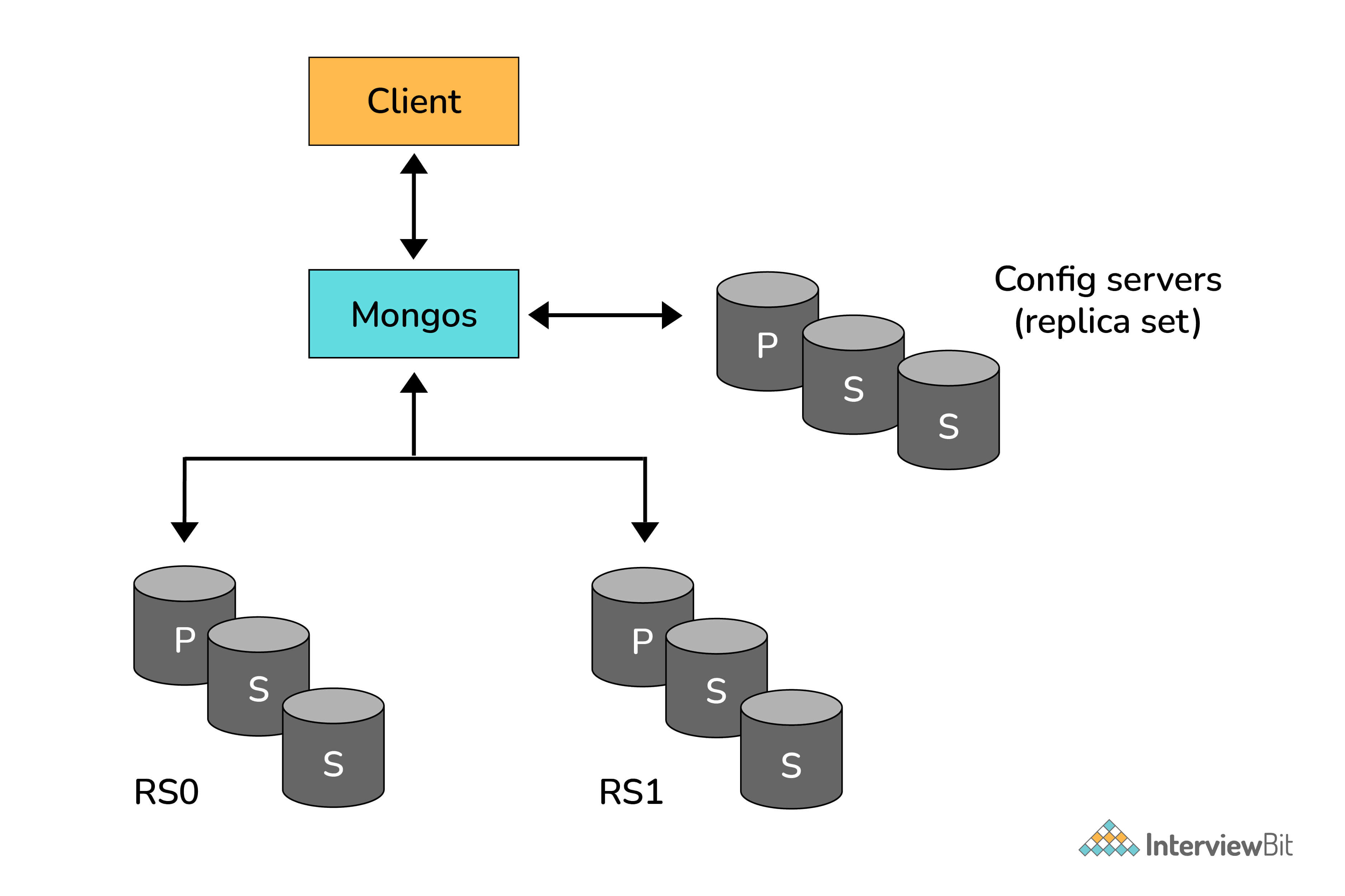
Sharding is the process of splitting data up across machines. We also use the term “partitioning” sometimes to describe this concept. We can store more data and handle more load without requiring larger or more powerful machines, by putting a subset of data on each machine.
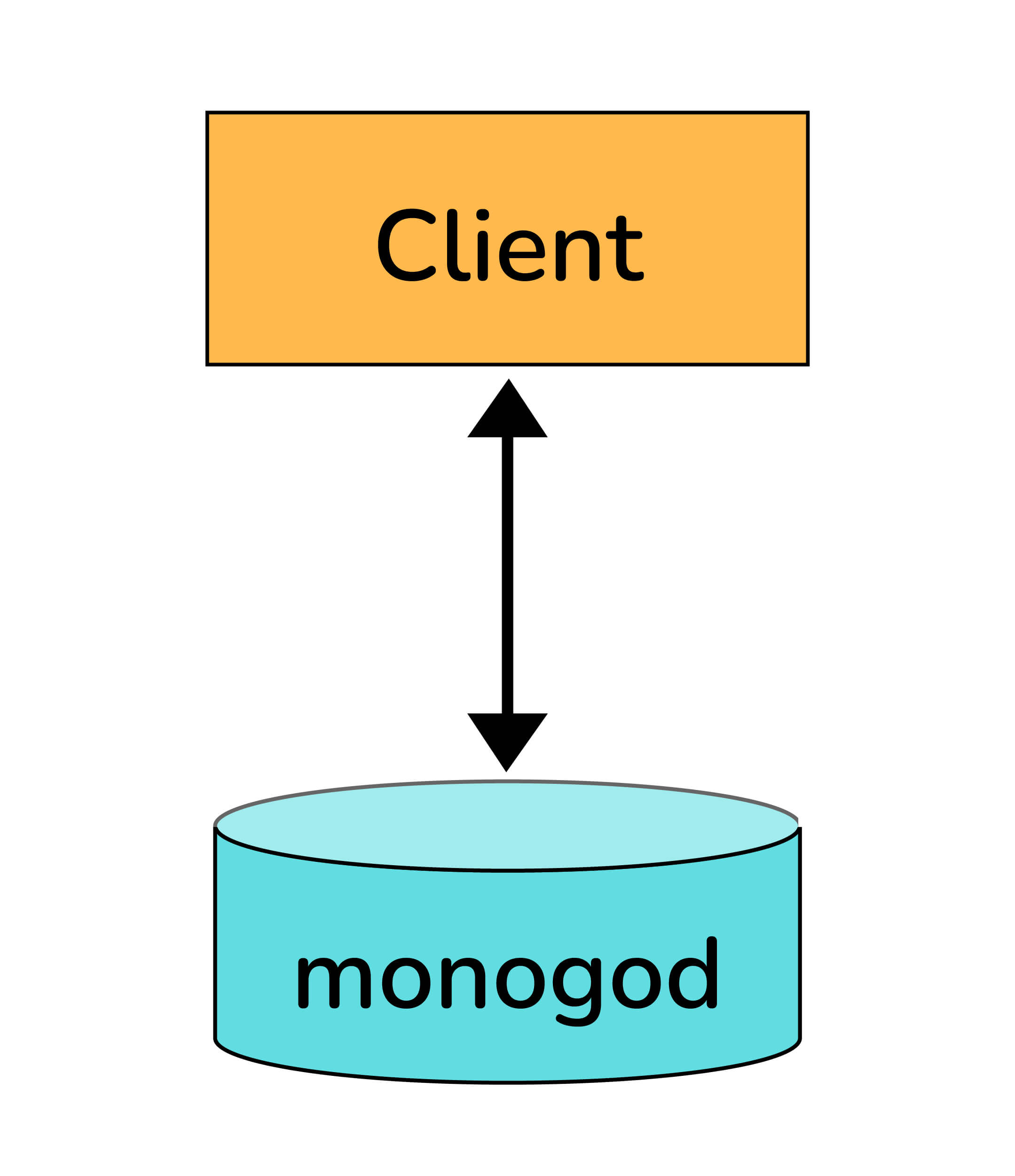
In the figure below, RS0 and RS1 are shards. MongoDB’s sharding allows you to create a cluster of many machines (shards) and break up a collection across them, putting a subset of data on each shard. This allows your application to grow beyond the resource limits of a standalone server or replica set.
# Explain the SET Modifier in MongoDB?
If the value of a field does not yet exist, the “$set” sets the value. This can be useful for updating schemas or adding user-defined keys.
Example:
1 | |
To add a field to this, we use “$set”:
1 | |
# Advanced
# What do you mean by Transactions?
A transaction is a logical unit of processing in a database that includes one or more database operations, which can be read or write operations. Transactions provide a useful feature in MongoDB to ensure consistency.
MongoDB provides two APIs to use transactions.
- Core API: It is a similar syntax to relational databases (e.g., start_transaction and commit_transaction)
- Call-back API: This is the recommended approach to using transactions. It starts a transaction, executes the specified operations, and commits (or aborts on the error). It also automatically incorporates error handling logic for “TransientTransactionError” and"UnknownTransactionCommitResult".
# What are MongoDB Charts?
MongoDB Charts is a new, integrated tool in MongoDB for data visualization.
MongoDB Charts offers the best way to create visualizations using data from a MongoDB database.
It allows users to perform quick data representation from a database without writing code in a programming language such as Java or Python.
The two different implementations of MongoDB Charts are:
- MongoDB Charts PaaS (Platform as a Service)
- MongoDB Charts Server
# What is the Aggregation Framework in MongoDB?
- The aggregation framework is a set of analytics tools within MongoDB that allow you to do analytics on documents in one or more collections.
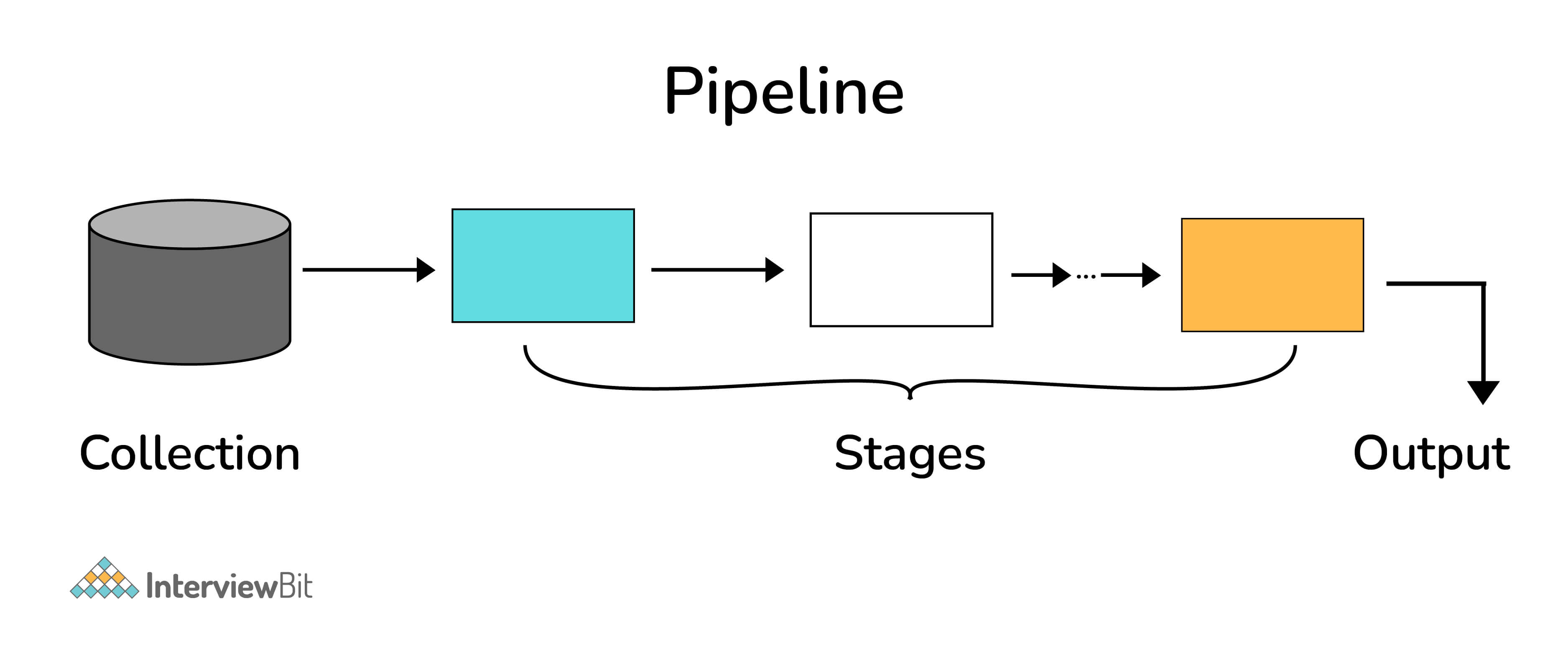
- The aggregation framework is based on the concept of a pipeline. With an aggregation pipeline, we take input from a MongoDB collection and pass the documents from that collection through one or more stages, each of which performs a different operation on its inputs (See figure below). Each stage takes as input whatever the stage before it produced as output. The inputs and outputs for all stages are documents—a stream of documents.
# Explain the concept of pipeline in the MongoDB aggregation framework.
An individual stage of an aggregation pipeline is a data processing unit. It takes in a stream of input documents one at a time, processes each document one at a time, and produces an output stream of documents one at a time (see figure below).
# What is a Replica Set in MongoDB?
To keep identical copies of your data on multiple servers, we use replication. It is recommended for all production deployments. Use replication to keep your application running and your data safe, even if something happens to one or more of your servers.
Such replication can be created by a replica set with MongoDB. A replica set is a group of servers with one primary, the server taking writes, and multiple secondaries, servers that keep copies of the primary’s data. If the primary crashes, the secondaries can elect a new primary from amongst themselves.
# What is Replica Set in MongoDB?
It is a group of mongo processes that maintain same data set. Replica sets provide redundancy and high availability, and are the basis for all production deployments. A replica set contains a primary node and multiple secondary nodes.
The primary node receives all write operations. A replica set can have only one primary capable of confirming writes with { w: “majority” } write concern; although in some circumstances, another mongod instance may transiently believe itself to also be primary.
The secondaries replicate the primary’s oplog and apply the operations to their data sets such that the secondaries’ data sets reflect the primary’s data set. If the primary is unavailable, an eligible secondary will hold an election to elect itself the new primary.
# How does MongoDB ensure high availability?
High Availability (HA) refers to the improvement of system and app availability by minimizing the downtime caused by routine maintenance operations (planned) and sudden system crashes (unplanned).
Replica Set
The replica set mechanism of MongoDB has two main purposes:
- One is for data redundancy for failure recovery. When the hardware fails, or the node is down for other reasons, you can use a replica for recovery.
- The other purpose is for read-write splitting. It routes the reading requests to the replica to reduce the reading pressure on the primary node.
MongoDB automatically maintains replica sets, multiple copies of data that are distributed across servers, racks and data centers. Replica sets help prevent database downtime using native replication and automatic failover.
A replica set consists of multiple replica set members. At any given time, one member acts as the primary member, and the other members act as secondary members. If the primary member fails for any reason (e.g., hardware failure), one of the secondary members is automatically elected to primary and begins to process all reads and writes.
# Explain the Replication Architecture in MongoDB.
The following diagram depicts the architecture diagram of a simple replica set cluster with only three server nodes – one primary node and two secondary nodes:
- In the preceding model, the PRIMARY database is the only active replica set member that receives write operations from database clients. The PRIMARY database saves data changes in the Oplog. Changes saved in the Oplog are sequential—that is, saved in the order that they are received and executed.
- The SECONDARY database is querying the PRIMARY database for new changes in the Oplog. If there are any changes, then Oplog entries are copied from PRIMARY to SECONDARY as soon as they are created on the PRIMARY node.
- Then, the SECONDARY database applies changes from the Oplog to its own datafiles. Oplog entries are applied in the same order they were inserted in the log. As a result, datafiles on SECONDARY are kept in sync with changes on PRIMARY.
- Usually, SECONDARY databases copy data changes directly from PRIMARY. Sometimes a SECONDARY database can replicate data from another SECONDARY. This type of replication is called Chained Replication because it is a two-step replication process. Chained replication is useful in certain replication topologies, and it is enabled by default in MongoDB.
# What are some utilities for backup and restore in MongoDB?
The mongo shell does not include functions for exporting, importing, backup, or restore. However, MongoDB has created methods for accomplishing this, so that no scripting work or complex GUIs are needed. For this, several utility scripts are provided that can be used to get data in or out of the database in bulk. These utility scripts are:
- mongoimport
- mongoexport
- mongodump
- mongorestore
# What are the differences between MongoDB and SQL-SERVER?
- The MongoDB store the data in documents with JSON format but SQL store the data in Table format.
- The MongoDB provides high performance, high availability, easy scalability etc. rather than SQL Server.
- In the MongoDB, we can change the structure simply by adding, removing column from the existing documents.
MongoDB and SQL Server Comparision Table
| Base of Comparison | MS SQL Server | MongoDB |
|---|---|---|
| Storage Model | RDBMS | Document-Oriented |
| Joins | Yes | No |
| Transaction | ACID | Multi-document ACID Transactions with snapshot isolation |
| Agile practices | No | Yes |
| Data Schema | Fixed | Dynamic |
| Scalability | Vertical | Horizontal |
| Map Reduce | No | Yes |
| Language | SQL query language | JSON Query Language |
| Secondary index | Yes | Yes |
| Triggers | Yes | Yes |
| Foreign Keys | Yes | No |
| Concurrency | Yes | yes |
| XML Support | Yes | No |
# How can you achieve transaction and locking in MongoDB?
In MongoDB (4.2), an operation on a single document is atomic. For situations that require atomicity of reads and writes to multiple documents (in a single or multiple collections), MongoDB supports multi-document transactions. With distributed transactions, transactions can be used across multiple operations, collections, databases, documents, and shards.
MongoDB allows multiple clients to read and write the same data. In order to ensure consistency, it uses locking and other concurrency control measures to prevent multiple clients from modifying the same piece of data simultaneously.
MongoDB uses multi-granularity locking that allows operations to lock at the global, database or collection level, and allows for individual storage engines to implement their own concurrency control below the collection level (e.g., at the document-level in WiredTiger). MongoDB uses reader-writer locks that allow concurrent readers shared access to a resource, such as a database or collection.
The lock modes are represented as follows:
| Lock Mode | Description |
|---|---|
| R | Represents Shared (S) lock. |
| W | Represents Exclusive (X) lock. |
| r | Represents Intent Shared (IS) lock. |
| w | Represents Intent Exclusive (IX) lock. |
Example:
The following example highlights the key components of the transactions API
1 | |
# How MongoDB supports ACID transactions and locking functionalities?
ACID stands that any update is:
- Atomic: it either fully completes or it does not
- Consistent: no reader will see a “partially applied” update
- Isolated: no reader will see a “dirty” read
- Durable: (with the appropriate write concern)
MongoDB, has always supported ACID transactions in a single document and, when leveraging the document model appropriately, many applications don’t need ACID guarantees across multiple documents.
MongoDB is a document based NoSQL database with a flexible schema. Transactions are not operations that should be executed for every write operation since they incur a greater performance cost over a single document writes. With a document based structure and denormalized data model, there will be a minimized need for transactions. Since MongoDB allows document embedding, you don’t necessarily need to use a transaction to meet a write operation.
MongoDB version 4.0 provides multi-document transaction support for replica set deployments only and probably the version 4.2 will extend support for sharded deployments.
Example: Multi-Document ACID Transactions in MongoDB
These are multi-statement operations that need to be executed sequentially without affecting each other. For example below we can create two transactions, one to add a user and another to update a user with a field of age.
1 | |
Transactions can be applied to operations against multiple documents contained in one or many collection/database. Any changes due to document transaction do not impact performance for workloads not related or do not require them. Until the transaction is committed, uncommitted writes are neither replicated to the secondary nodes nor are they readable outside the transactions.
# What are the best practices for MongoDB Transactions?
The multi-document transactions are only supported in the WiredTiger storage engine. For a single ACID transaction, if you try performing an excessive number of operations, it can result in high pressure on the WiredTiger cache. The cache is always dictated to maintain state for all subsequent writes since the oldest snapshot was created. This means new writes will accumulate in the cache throughout the duration of the transaction and will be flushed only after transactions currently running on old snapshots are committed or aborted.
For the best database performance on the transaction, developers should consider:
- Always modify a small number of documents in a transaction. Otherwise, you will need to break the transaction into different parts and process the documents in different batches. At most, process 1000 documents at a time.
- Temporary exceptions such as awaiting to elect primary and transient network hiccups may result in abortion of the transaction. Developers should establish a logic to retry the transaction if the defined errors are presented.
- Configure optimal duration for the execution of the transaction from the default 60 seconds provided by MongoDB. Besides, employ indexing so that it can allow fast data access within the transaction.
- Decompose your transaction into a small set of operation so that it fits the 16MB size constraints. Otherwise, if the operation together with oplog description exceed this limit, the transaction will be aborted.
- All data relating to an entity should be stored in a single, rich document structure. This is to reduce the number of documents that are to be cached when different fields are going to be changed.
# Explain limitations of MongoDB Transactions?
MongoDB transactions can exist only for relatively short time periods. By default, a transaction must span no more than one minute of clock time. This limitation results from the underlying MongoDB implementation. MongoDB uses MVCC, but unlike databases such as Oracle, the “older” versions of data are kept only in memory.
- You cannot create or drop a collection inside a transaction.
- Transactions cannot make writes to a capped collection
- Transactions take plenty of time to execute and somehow they can slow the performance of the database.
- Transaction size is limited to 16MB requiring one to split any that tends to exceed this size into smaller transactions.
- Subjecting a large number of documents to a transaction may exert excessive pressure on the WiredTiger engine and since it relies on the snapshot capability, there will be a retention of large unflushed operations in memory. This renders some performance cost on the database.
# When to Use MongoDB Rather than MySQL?
- MongoDB
MongoDB is one of the most popular document-oriented databases under the banner of NoSQL database. It employs the format of key-value pairs, here called document store. Document stores in MongoDB are created is stored in BSON files which are, in fact, a little-modified version of JSON files and hence all JS are supported.
It offers greater efficiency and reliability which in turn can meet your storage capacity and speed demands. The schema-free implementation of MongoDB eliminates the prerequisites of defining a fixed structure. These models allow hierarchical relationships representation and facilitate the ability to change the structure of the record.
Pros
- MongoDB has a lower latency per query & spends less CPU time per query because it is doing a lot less work (e.g. no joins, transactions). As a result, it can handle a higher load in terms of queries per second.
- MongoDB is easier to shard (use in a cluster) because it doesn’t have to worry about transactions and consistency.
- MongoDB has a faster write speed because it does not have to worry about transactions or rollbacks (and thus does not have to worry about locking).
- It supports many Features like automatic repair, easier data distribution, and simpler data models make administration and tuning requirements lesser in NoSQL.
- NoSQL databases are cheap and open source.
- NoSQL database support caching in system memory so it increases data output performance.
Cons
- MongoDB does not support transactions.
- In general, MongoDB creates more work (e.g. more CPU cost) for the client server. For example, to join data one has to issue multiple queries and do the join on the client.
- No Stored Procedures in mongo dB (NoSQL database).
- Reasons to Use a NoSQL Database
Storing large volumes of data without structure: A NoSQL database doesn’t limit storable data types. Plus, you can add new types as business needs change.
Using cloud computing and storage: Cloud-based storage is a great solution, but it requires data to be easily spread across multiple servers for scaling. Using affordable hardware on-site for testing and then for production in the cloud is what NoSQL databases are designed for.
Rapid development: If you are developing using modern agile methodologies, a relational database will slow you down. A NoSQL database doesn’t require the level of preparation typically needed for relational databases.
- MySQL
MySQL is a popular open-source relational database management system (RDBMS) that is developed, distributed and supported by Oracle Corporation. MySQL stores data in tables and uses structured query language (SQL) for database access. It uses Structured Query Language SQL to access and transfer the data and commands such as ‘SELECT’, ‘UPDATE’, ‘INSERT’ and ‘DELETE’ to manage it.
Related information is stored in different tables but the concept of JOIN operations simplifies the process of correlating it and performing queries across multiple tables and minimize the chances of data duplication. It follows the ACID (Atomic, Consistent, Isolated and Durable) model. This means that once a transaction is complete, the data remains consistent and stable on the disc which may include distinct multiple memory locations.
Pros
- SQL databases are table based databases.
- Data store in rows and columns
- Each row contains a unique instance of data for the categories defined by the columns.
- Provide facility primary key, to uniquely identify the rows.
Cons
- Users have to scale relational database on powerful servers that are expensive and difficult to handle. To scale relational database, it has to be distributed on to multiple servers. Handling tables across different servers is difficult.
- In SQL server’s data has to fit into tables anyhow. If your data doesn’t fit into tables, then you need to design your database structure that will be complex and again difficult to handle.
# Should I normalize my data before storing it in MongoDB?
Data used by multiple documents can either be embedded (denormalized) or referenced (normalized). Normalization, which is increasing the complexity of the schema by splitting tables into multiple smaller ones to reduce the data redundancy( 1NF, 2NF, 3NF).
But Mongo follows the exact opposite way of what we do with SQL. In MongoDB, data normalization is not requried. Indeed we need to de-normalize and fit it into a collection of multiple documents.
Example: Let’s say we have three tables
1 | |
# What is oplog?
The OpLog (Operations Log) is a special capped collection that keeps a rolling record of all operations that modify the data stored in databases.
MongoDB applies database operations on the primary and then records the operations on the primary’s oplog. The secondary members then copy and apply these operations in an asynchronous process. All replica set members contain a copy of the oplog, in the local.oplog.rs collection, which allows them to maintain the current state of the database.
Each operation in the oplog is idempotent. That is, oplog operations produce the same results whether applied once or multiple times to the target dataset.
Example: Querying The OpLog
1 | |
# Does MongoDB pushes the writes to disk immediately or lazily?
MongoDB pushes the data to disk lazily. It updates the immediately written to the journal but writing the data from journal to disk happens lazily.
# What is Sharding in MongoDB?
Sharding is a method for distributing data across multiple machines. MongoDB uses sharding to support deployments with very large data sets and high throughput operations.
Database systems with large data sets or high throughput applications can challenge the capacity of a single server. For example, high query rates can exhaust the CPU capacity of the server. Working set sizes larger than the system’s RAM stress the I/O capacity of disk drives. There are two methods for addressing system growth: vertical and horizontal scaling.
- Vertical Scaling
Vertical Scaling involves increasing the capacity of a single server, such as using a more powerful CPU, adding more RAM, or increasing the amount of storage space.
- Horizontal Scaling
Horizontal Scaling involves dividing the system dataset and load over multiple servers, adding additional servers to increase capacity as required. While the overall speed or capacity of a single machine may not be high, each machine handles a subset of the overall workload, potentially providing better efficiency than a single high-speed high-capacity server.
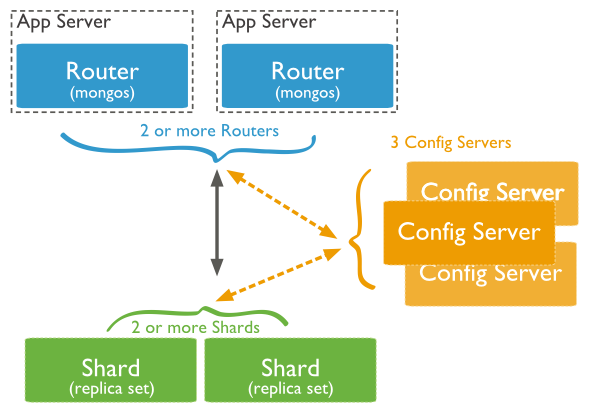
MongoDB supports horizontal scaling through sharding. A MongoDB sharded cluster consists of the following components:
- Shards: Each shard contains a subset of the sharded data. Each shard can be deployed as a replica set.
- Mongos: The mongos acts as a query router, providing an interface between client applications and the sharded cluster. Starting in MongoDB 4.4, mongos can support hedged reads to minimize latencies.
- Config Servers: Config servers store metadata and configuration settings for the cluster.